- http://webstyleguide.com/wsg2/graphics/displays.html
- http://en.wikipedia.org/wiki/Color_depth
- http://electronics.howstuffworks.com/question487.htm Analog vs Digital Audio
- http://www.sevenforums.com/installation-setup/86886-32-bit-vs-64-bit-comparison.html
- http://en.wikipedia.org/wiki/64-bit_computing
Showing posts with label 64. Show all posts
Showing posts with label 64. Show all posts
Friday, 6 September 2013
Bits and stuff
A set of interesting links on the impact and application of bit width/resolution:


Friday, 30 December 2011
Which 11.10?
Just thought it may be useful to someone... If you're into Linux, you may feel confused with the latest changes in our good old desktops. Gnome 3, Unity, etc.
For what is worth, I'm using Xubuntu 11.10 on my netbook (Asus EeePC 1015PX)
and Ubuntu 11.04 (64 bit version) on my desktop (Phenom II quad-core rig I assembled myself). I love the fact that I can choose Gnome 2 (Ubuntu classic) at login, as shown by this screenshot:

If you have any question, post them on your comments. I'll be glad to answer them, as soon as I have the time.
For what is worth, I'm using Xubuntu 11.10 on my netbook (Asus EeePC 1015PX)
and Ubuntu 11.04 (64 bit version) on my desktop (Phenom II quad-core rig I assembled myself). I love the fact that I can choose Gnome 2 (Ubuntu classic) at login, as shown by this screenshot:
If you have any question, post them on your comments. I'll be glad to answer them, as soon as I have the time.
Thursday, 30 December 2010
Flash for 64 bit Linux
 Short post. If you're using a Linux distro for the x64 (x86-64) architecture, this page from Adobe Labs has all the info and istructions you need to install it.
I've tried it and works very fast! So far, haven't had any problems with it.


The way I've done it is to extract the libflashplayer.so from the file (i.e. flashplayer10_2_p3_64bit_linux_111710.tar.gz, just right click on it and choose 'Extract here') and then move it to the /usr/lib64/mozilla/plugins/ folder via the following terminal commands:
*Notes*
Hope this helps.
cd ~/DownloadsOf course this is assuming you downloaded the file to your home folder's Downloads folder (the usual case). If you're using Konqueror, you may need to add the Flash plugin by going to Settings>Configure Konqueror>Plugins (last item), then select the Plugins tab, and click on the "Scans for plugins" button.
sudo cp libflashplayer.so /usr/lib64/mozilla/plugins/
*Notes*
- The Adobe Labs link was updated as the preview of the 64-bit Adobe Flash Player Square is now available for Linux, Mac OS X, and Windows).
- More information is available at this Ubuntu Documentation page (removal of non-64 bit Flash plugins, alternative way of installing it, and such)
Hope this helps.
Wednesday, 15 July 2009
64 bit mania
I've been eyeing again at the possibility of running the 64 bit version of Windows (Vista or 7 RC1).
Especially after an encouraging success with Ubuntu 9.04 (64-bit), I got the itch again.
I found these interesting and useful web sites:
The frist one, called start64.com, which I'm reading now. It has information regarding 64-bit technology for Vista, Windows 7, and also Linux.
Second, this article at Tomshardware.com, which explains things you should know about Windows, 32 vs 64 bit. If you want to skip the details, at least read the article's conclusions.
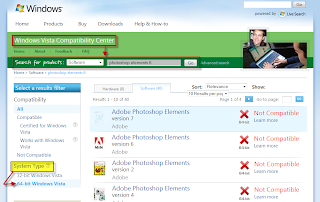
Third, Microsoft itself. They have a "Windows Vista Compatibility Centre", a one-stop databse where you can check whether your hardware and software is compatible with Windows or not. Just check the 64 bit option and you're all set. Check the screenshot below for reference.
Especially after an encouraging success with Ubuntu 9.04 (64-bit), I got the itch again.
I found these interesting and useful web sites:
The frist one, called start64.com, which I'm reading now. It has information regarding 64-bit technology for Vista, Windows 7, and also Linux.
Second, this article at Tomshardware.com, which explains things you should know about Windows, 32 vs 64 bit. If you want to skip the details, at least read the article's conclusions.
Third, Microsoft itself. They have a "Windows Vista Compatibility Centre", a one-stop databse where you can check whether your hardware and software is compatible with Windows or not. Just check the 64 bit option and you're all set. Check the screenshot below for reference.

Subscribe to:
Posts (Atom)
-
 Lenovo Ideapad S10-3 If you have a Lenovo Ideapad S10-3 (depicted above), and you want to test or install shiny new Ubuntu 10.10 on it,...
 -
This brief post shows how to create a bi-dimentional array and describe it using IB pseudocode. It isn't stated in the IB Pseudocode in ...
-
In order to program in Java, you may want to follow the instructions and videos that I have prepared. They are simle and straightforward, an...